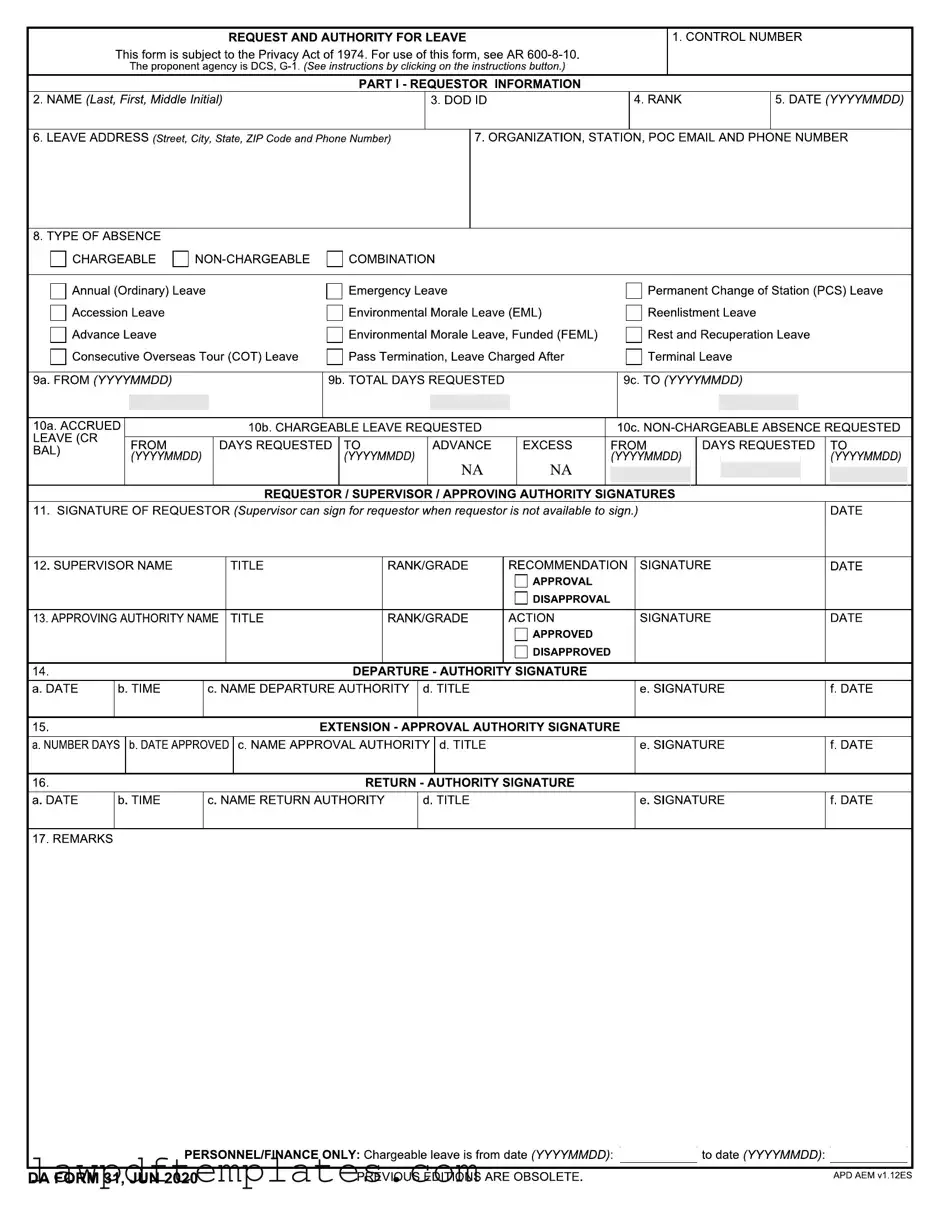
Fillable Da 31 Template
File Details
| Fact Name | Details |
|---|---|
| Form Purpose | The DA 31 form is used to request and authorize leave for military personnel. |
| Governing Law | This form is governed by AR 600-8-10. |
| Privacy Act Compliance | The form is subject to the Privacy Act of 1974, protecting personal information. |
| Requestor Information | Part I collects essential information about the requestor, including name and DOD ID. |
| Leave Types | Various leave types are available, such as Annual Leave, Emergency Leave, and PCS Leave. |
| Signature Requirement | The requestor's signature is mandatory; a supervisor can sign on their behalf if unavailable. |
| Approval Process | Supervisors and approving authorities must sign to indicate approval or disapproval. |
| Extension Requests | Extensions to leave must also be approved and documented on the form. |
| Remarks Section | A remarks section is included for additional notes relevant to the leave request. |
| Obsolescence Notice | The form states that previous editions are obsolete, ensuring the use of the current version. |
Sample - Da 31 Form
Common mistakes
Filling out the DA 31 form can be a straightforward process, but there are common mistakes that can lead to delays or complications. One frequent error is failing to provide complete and accurate personal information. The form requires the requestor's name, DOD ID, and rank. Omitting any of this information can result in processing issues. Ensure that all fields are filled out correctly to avoid unnecessary delays.
Another mistake involves incorrect dates. The form requires specific date formats, particularly in the sections for leave dates. Some individuals may write dates in an incorrect format or fail to ensure that the "from" and "to" dates align logically. For example, the "to" date must always be after the "from" date. Double-checking these entries can prevent confusion and ensure that the request is processed smoothly.
Additionally, misunderstanding the types of leave can lead to errors. The form provides various options for leave types, such as chargeable and non-chargeable leave. Selecting the wrong type can have implications for leave balances and entitlements. It is essential to understand the distinctions between these categories and select the appropriate one based on individual circumstances.
Finally, neglecting to obtain the necessary signatures can halt the approval process. The form requires signatures from the requestor, supervisor, and approving authority. If any signature is missing, the request may be deemed incomplete. To avoid this issue, ensure that all required signatures are obtained before submitting the form.
Common PDF Documents
Progressive Supplements - Provide your preferred contact method for updates.
How to Make a Doctor Excuse for Work - Serves as an official notice to educational institutions.
For those looking to streamline their delivery process, utilizing the FedEx Release Form can be incredibly beneficial. This document not only facilitates the safe delivery of packages in the absence of the recipient but also provides clarity on delivery specifics. By completing this form accurately, recipients can avoid common pitfalls associated with missed deliveries, and for templates and guidance, one can refer to Fast PDF Templates.
How Do I Get a Direct Deposit Form - Stay organized and always know when your money will arrive with direct deposit.